기능 안내
하루를 설계하는 디지털 노트의 모든 기능 · A complete tour of Own Your Life
← 메인 페이지로 / Back to homev2.2 — 오늘이 더 따뜻해졌어요 (2026-05)
- · 종이톤이 더 따뜻한 크림으로, 잉크색이 살짝 부드러워졌습니다
- · '오늘' 화면에 큰 날짜 숫자와 italic '오늘'이 들어간 새 헤더
- · 사진·기록·할 일을 모으는 새 펜촉 버튼
- · 일정에 다섯 가지 색을 입힐 수 있는 옵션 (기본은 조용함)
- · 12월 마지막 주에 한 해를 봉인하는 짧은 순간
- · 생일 아침의 짧은 인사 (생일을 입력하신 경우)
- · '연속' 대신 '쓴 날' — 점수가 아닌 흔적
- · '회고 모음' — 하루·한 주·한 해의 기록을 다시 보는 곳, 일상어로 정돈된 톤
- · 탭 사이 이동·리뷰 진입이 한층 매끄럽게
목차
Daily Log — 하루를 적는 자리
"종이 저널의 의도성과 디지털의 속도, 그 사이의 균형."
OYL의 출발점이자 가장 자주 머무는 화면입니다. 하루를 기호 기반 빠른 기록으로 남길 수 있도록 설계되었습니다.
세 가지 기호로 모든 것을 분류합니다 — · (할 일), ○ (이벤트), — (메모). 별도의 카테고리를 만들 필요도, 색깔을 정할 필요도 없습니다. 적는 행위 자체가 분류입니다.
- 빠른 입력 (QuickAdd): 화면 하단에 항상 떠있는 입력창. 한 줄 적고 엔터, 끝.
- 시간 자동 인식: "내일 3시 미팅"이라고 적으면 자동으로 시간 추출 + 일정 등록.
- 우선순위 색조: 높음/보통/낮음을 색의 농도로만 표현. 빨간 알람 없음.
- 미완료 자동 이월: 어제의 할 일이 자동으로 오늘로 옮겨집니다.
- 오늘의 저널: 한 문장으로 하루를 묶는 별도 공간.
- 10년 후 비전 카드: 첫 3일 사용 후 부드럽게 등장하는 회고 질문.
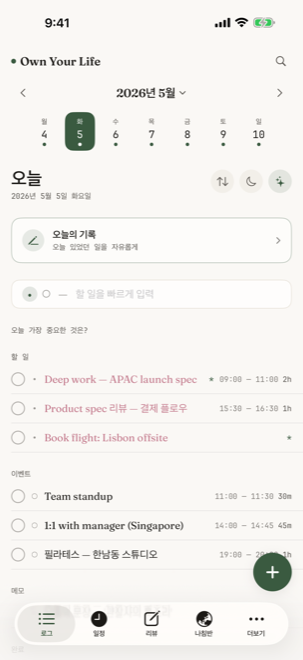
하루를 적는 자리
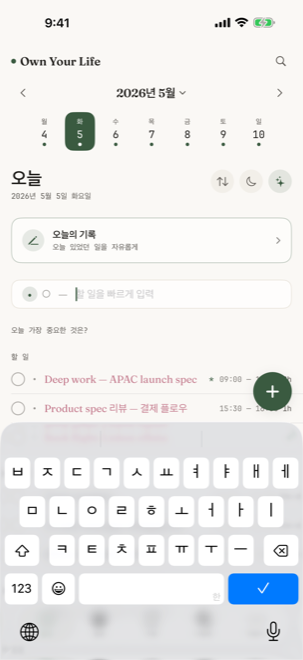
화면 하단 QuickAdd 입력창
빠른 입력 (QuickAdd)
화면 어디에 있어도 한 줄로 기록할 수 있습니다. "회의록 정리", "오후 3시 카페에서 만남", "한 주가 너무 빨랐다" — 한 입력창이 세 기호 모두를 받습니다.
스마트 시간 인식
한국어/영어로 작성된 시간 표현을 정규식으로 감지합니다. "내일 오후 3시", "tomorrow 3pm", "9시 운동" 등 — 일정 블록을 자동 생성합니다.
스와이프 액션
왼쪽 스와이프 — 편집/삭제. 오른쪽으로 살짝 당기면 완료 처리. 길게 누르면 reorder. 자주 쓰는 동작이 손가락 근처에 있습니다.
Calendar — 24시간의 풍경
"시간은 자원이 아니라 거주 공간이다."
OYL의 캘린더는 단순한 일정 보기가 아닙니다. 24시간의 타임라인이 아침부터 밤까지 한 화면에 펼쳐지고, 그 위에 색으로 호흡하는 일정 블록이 놓입니다.
시간을 _블로킹(blocking)_한다는 개념을 디지털에서 가장 정성스럽게 구현한 형태입니다. 각 블록은 단순히 일정이 아니라, "내가 이 한 시간을 무엇에 쓸지 의도적으로 정한 선언"입니다.
- 탭 → 즉시 60분 이벤트 생성: 시간 위를 탭하면 그 시간 정시에 이벤트 시트가 열립니다.
- iOS 캘린더 통합: EventKit으로 시스템 캘린더 이벤트를 색다른 톤으로 오버레이.
- 월·주·일 네비게이션: 상단 스트립으로 빠르게 이동.
- 오늘 시간 표시: 빨간 가로선이 현재 시각을 표시.
- 이벤트 길이를 시각화: 30분 미팅과 2시간 딥워크가 크기로 구분됩니다.
- 색 = 한 가지 의도: 일정의 lifeArea(7개 축) 기반 색조 — 빨강/파랑 분류 X.
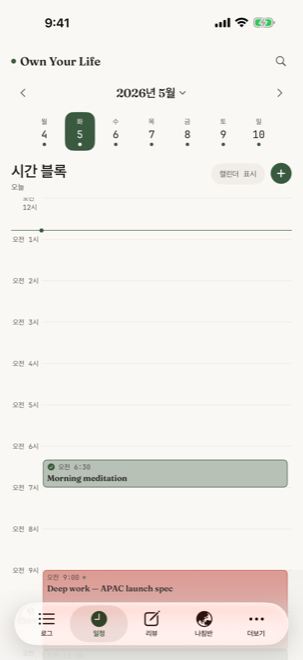
24시간의 풍경
Habits — 작은 반복의 풍경
"점수가 아니라 흔적을 본다."
OYL의 습관은 "쓴 날"이라는 개념을 씁니다. 연속 일수로 압박하지 않고, 빠진 날에 빨간 표시도, "X일 연속을 깼습니다" 알림도 없습니다. 대신 30일을 한 화면에 펼쳐 패턴을 보게 합니다.
- 30일 그리드: 한 달의 체크인을 하나의 풍경으로.
- 마일스톤 알림: 7일·90일·100일 — 압박이 아닌 작은 축하.
- "쓴 날" (Practiced): 점수가 아닌, 꾸준히 이어온 가장 긴 연습.
- 빠진 날 처리: 비어있는 칸은 그저 비어있을 뿐. 사과 강요 없음.
- LifeArea 연결: 각 습관이 어느 인생 축에 속하는지 자동 연결.
Compass — 일곱 개의 축
"방향이 완성보다 중요하다."
건강, 일, 관계, 마음, 배움, 즐거움, 의미 — 일곱 개의 LifeArea로 인생의 균형을 살펴봅니다. 각 축에 1~10점을 스스로 매기고, 매주 그 변화를 봅니다.
점수는 _경쟁_을 위한 것이 아닙니다. 다이아몬드 차트 위에 그려지는 자신의 모양이 지난 주와 어떻게 다른지를 _목격_하는 도구입니다. 김호 "방향이 완성보다 중요"의 시각화.
- 다이아몬드 차트: 일곱 개 축의 점수를 한눈에.
- 이상적 하루 (Ideal Day): 일곱 축이 균형 잡힌 하루의 시간 배분을 시각화.
- 주간 변화: 지난 주 대비 각 축의 Δ를 색으로 표시.
- Balance Index: 일곱 축의 표준편차로 계산되는 균형 지표.
- 맥락적 첫 진입: 처음 Compass 탭을 열 때 부드러운 안내가 등장.
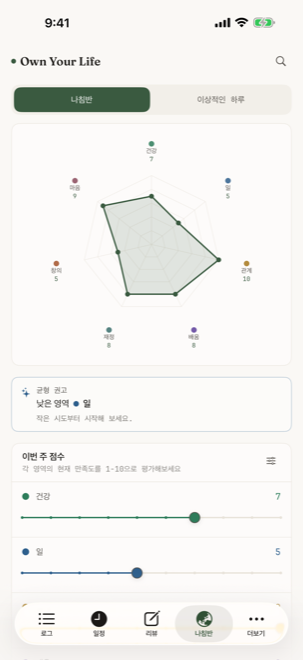
일곱 개 축의 다이아몬드
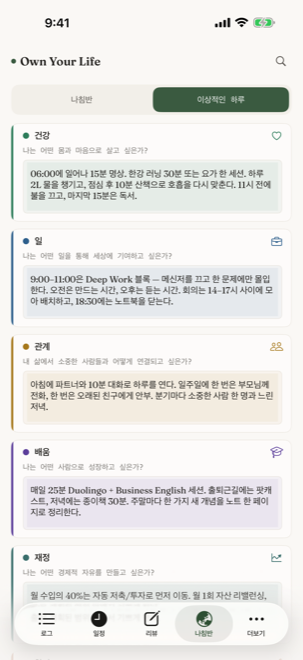
이상적 하루의 시간 배분
Ideal Day 시각화
"내가 이상적으로 살고 싶은 하루"의 시간을 일곱 축에 배분합니다. 실제로 산 하루와 비교하면, _무엇이 다른지_가 즉시 보입니다.
축은 _고정_, 의미는 _당신의 것_
일곱 개 축은 OYL이 정해놓은 그릇입니다. 그러나 "건강이 당신에게 무엇을 의미하는지"는 OYL이 결정하지 않습니다. 사용자의 정의가 그 그릇을 채웁니다.
Reviews — 네 가지 시간 단위의 회고
"회고하는 사람만이 자기 삶의 저자가 된다."
OYL의 회고는 네 가지 시간 단위로 분리되어 있습니다 — 일간 / 주간 / 분기 / 연간. 각 단위마다 _다른 질문_, _다른 깊이_, _다른 페이지_.
- 일간 회고: 잠들기 전 한 줄. "오늘, 가장 잘한 것은?" 또는 비어둠.
- 주간 회고: 일요일 30분의 의식. 지난 주의 7축 변화 + 다음 주의 의도 한 줄.
- 분기 회고: OKR의 정직한 점검. 강제된 점수 X — _느낌_으로 표시.
- 연간 내러티브 (Annual Letter): 한 해를 마무리하는 자리. 미래의 자신에게 보내는 편지.
- 1년 전 카드: "이날 1년 전에는 무엇을 했나요?" 회고를 _자동으로_ 받습니다.
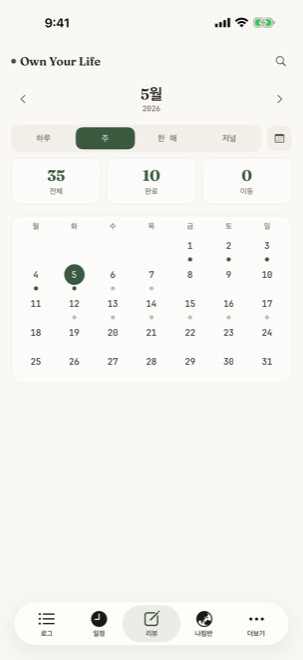
일요일 30분의 의식
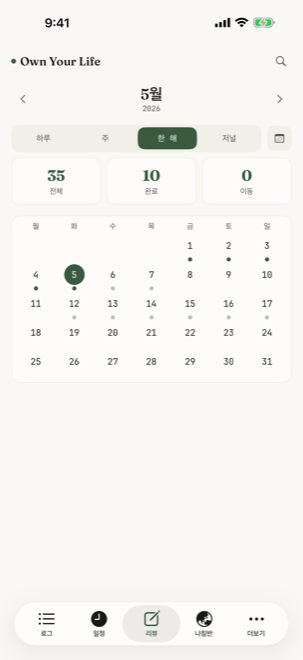
연간 내러티브 — 한 해의 마무리
네 가지 단위의 _다른_ 깊이
일간은 한 줄, 주간은 한 단락, 분기는 한 페이지, 연간은 한 편의 편지. 깊이가 시간 단위에 _비례_합니다.
회고는 _선택_, 강요 X
회고를 못 한 주가 있어도 빨간 표시 없음. 다음 주에 다시 돌아오면 그 자리가 그대로 비어 있을 뿐. OYL은 _기록을 강요하지 않습니다_.
OKR — 목표를 일곱 축에 매핑
"목표는 완수의 대상이 아니라, 방향의 표지."
OYL의 OKR은 회사용 도구가 아닙니다. Google이 만든 OKR 프레임을 _개인의 삶에 맞춰 단순화_한 것입니다.
매 분기마다 1~3개의 Objective를 설정하고, 각 Objective에 1~3개의 Key Result를 둡니다. 각 Objective는 일곱 축 중 하나에 속하며, 자동으로 Compass의 균형 지표에 반영됩니다.
- 분기 단위 설정: 매 분기 시작에 OKR을 새로 정의.
- LifeArea 연결: 각 Objective는 일곱 축 중 하나에 명시적으로 매핑.
- 달성률 시각화: 진행 막대로 _현재 어디_인지를 한눈에.
- 분기 회고에 자동 통합: Reviews의 분기 단위에서 OKR이 자연스럽게 등장.
- 점수 X, 솔직함 O: 100% 달성보다 _정직한 평가_를 우선.
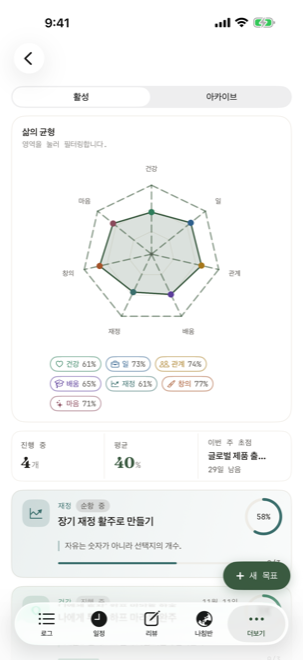
분기 OKR 목록
Future Log — 미래의 자신에게 보내는 기록
"먼 미래는 _지금_의 메모에서 시작된다."
지금 일정에 넣기엔 너무 멀지만 잊고 싶지 않은 것들이 있습니다 — "12월에 친구 결혼식", "내년 봄 휴가 계획", "다음 분기에 시도해볼 새로운 운동". OYL의 Future Log는 월 단위로 묶이는 미래의 메모를 위한 자리입니다.
- 월 단위 묶음: 미래의 12개월을 한눈에 펼쳐 보여줍니다.
- 해당 월 진입 시 자동 promote: 12월이 되면 12월의 메모가 Daily Log로 옮겨집니다.
- 제한 없는 미래: 1년 뒤든 5년 뒤든 적을 수 있습니다.
Collection — 영감의 결
"우연히 마주친 것들을 모아두는 보관함."
하루의 흐름과 별개로, 마음에 머무는 것들이 있습니다 — 카페에서 본 책 표지, 산책 중에 떠오른 문장, 누군가의 인용. Collection은 그런 _영감의 결_을 사진과 짧은 메모로 보관하는 자리입니다.
- 사진 + 메모 + 태그: 한 항목당 세 요소만.
- 로컬 저장 우선: 사진은 사용자의 기기와 iCloud에만 머뭅니다 — 서버 X.
- 태그 기반 탐색: "산책", "책", "음악" 등의 자유 태그.
- 시간순/태그순 두 가지 뷰: 한쪽은 흐름, 다른 쪽은 주제.
Widgets — 홈 화면과 잠금 화면의 OYL
OYL은 네 가지 위젯을 제공합니다. 모두 같은 paper-and-ink 톤을 유지하며, 앱을 열지 않고도 _하루의 한 단면_을 볼 수 있게 합니다.
Today's Focus
오늘 가장 중요한 한 가지 + 다음 일정. Small / Medium / Large 사이즈.
Compass
일곱 축의 다이아몬드 차트. 한 번 보고 균형을 느낍니다.
Habits
오늘의 습관 체크인 진행도. Small에서 한 번에 5개까지.
쓴 날 (Practiced)
가장 길게 _이어지는 흐름_. 빠진 날은 표시하지 않습니다.
Settings — 도구를 당신에게 맞춥니다
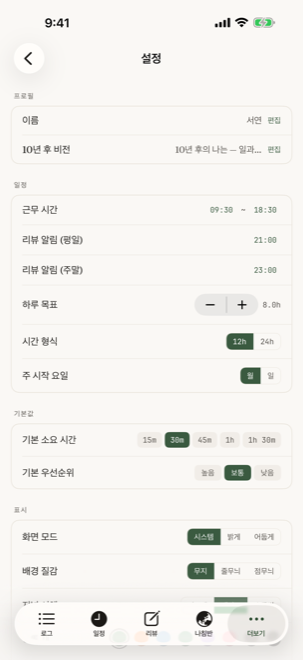
설정의 첫 화면
OYL은 설정으로 압도하지 않습니다. _필요한 것만_ 있고, 모두 한 화면에서 흐름으로 정리됩니다.
프로필
이름과 10년 후 비전을 언제든 편집. 온보딩에서 미루거나 비웠어도 여기서 다시 적을 수 있습니다.
스케줄
주의 시작 요일 (월/일), 하루의 시작 시각, 일과의 cut-off 시간.
기본값
새 todo의 기본 우선순위, 새 이벤트의 기본 길이 (15/30/60분).
표시 (Display)
언어 (7개), 라이트/다크, 폰트 사이즈, 색상 팔레트 선택.
iCloud 동기화
private container 동기화 ON/OFF. 데이터는 사용자의 iCloud에만 머뭅니다.
알림
일과 알림, 주간 회고 알림. 기본은 _침묵_ — 켜야만 울립니다.
데이터
JSON / Markdown 내보내기. iCloud 백업으로부터 복원. 모든 데이터 삭제 (Clear All).
데모 데이터
현실적인 1년 분량의 가상 데이터를 한 번에 로드. 처음 사용 시 화면을 채워보고 싶을 때.
이 앱의 사용 환경
- 한 번 구매하면 끝. 월/연 결제, 자동 갱신, 강제 업그레이드는 없습니다.
- 광고 없음. 앱 안에 광고가 존재하지 않습니다.
- 추적 없음. 제3자 분석 SDK를 사용하지 않고, 행동 데이터를 외부로 보내지 않습니다. 데이터는 당신의 기기와 당신의 iCloud에만 머뭅니다.
- 스코어를 매기지 않습니다. 연속 일수 강제, 배지, 리더보드, "응원합니다" 푸시 — 없음.
- AI는 평가하지 않습니다. AI가 당신을 분석하는 대신, 당신이 쓴 것을 정돈하는 데에만 쓰입니다 (그것도 기기 안에서).
- 기본은 빼는 것. 새 기능을 추가할 때마다 다른 기능 하나를 비활성화합니다. 도구가 무거워지지 않도록.
기술 사양
- 플랫폼: iOS 17 이상 (iPhone, iPad)
- 언어: 한국어, English, 日本語, 中文(简体), Français, Español, Português (7개)
- 저장: SwiftData 로컬 + iCloud private container (선택적)
- 가격: 현재 무료 (사용자 의견 수집 단계, 추후 유료 전환 시에도 무료 다운로더는 모든 기능 유지)
- 인앱 결제: 없음. 모든 기능 잠금 해제.
- 구독: 영원히 도입하지 않음.
- 분석: 제3자 SDK 미사용. 크래시 리포트만 Apple 표준 채널.
- 오프라인: 인터넷 없이도 모든 기능 사용 가능.
- 접근성: VoiceOver, Dynamic Type, Reduce Motion 지원.
v2.2 — Today feels warmer (2026-05)
- · Paper tone a little deeper and warmer, ink color softer
- · A new 'Today' header — a large date number next to italic "today"
- · A new quill-pen button for collecting photos, notes, and to-dos
- · Optional color-coding for your schedule (quiet by default)
- · A short sealing moment for the last week of December
- · A short greeting on your birthday morning (if you've entered your birthday)
- · 'Practiced' instead of 'Streak' — a trace, not a score
- · 'Looking back' — revisit your day, week, season, year, in plain everyday language
- · Smoother tab switching and faster Review entry
Contents
Daily Log — The place where the day is written
"The intention of paper journaling, at the speed of digital."
The starting point of OYL — and the screen you'll return to most. The Daily Log lets you capture the day using symbol-based quick logging: · (task), ○ (event), — (note). No categories to create, no colors to choose. The act of writing is the categorization.
- QuickAdd: Persistent input at the screen bottom. One line, enter, done.
- Smart time parsing: Write "tomorrow 3pm meeting" and the time block is auto-created.
- Priority by color tone: High / Medium / Low expressed as ink density. No red alarms.
- Auto-rollover: Yesterday's unfinished tasks land in today automatically.
- Today's journal: A separate one-line space to bind the day.
- 10-year vision card: A gentle reflective question appears after Day 3 of use.
Calendar — A 24-hour landscape
"Time is not a resource. It is a place to inhabit."
OYL's calendar is not just a scheduler. A 24-hour timeline stretches from morning to midnight on a single screen, and event blocks breathe over it in color. This is time blocking, rendered with the deepest care possible in digital form.
- Tap to create: Tap an hour row, a 60-minute event sheet opens at the hour.
- iOS Calendar integration: EventKit overlays system events in a distinct tone.
- Month / week / day navigation: Top strip for quick movement.
- Now indicator: A red horizontal line marks the current time.
- Length is visual: A 30-minute meeting and a 2-hour deep work block are distinguished by size.
- Color = one intention: Event hue is derived from its LifeArea — not red/blue categories.
Habits — A landscape of small repetitions
"Traces, not scores."
OYL uses the concept of "Practiced" instead of streaks. No pressure on missed days, no red marks, no "you broke your 12-day streak" notifications. Instead, 30 days are laid out as a single landscape — so the pattern becomes visible, not the failures.
- 30-day grid: A month's check-ins as a single landscape.
- Milestones, not pressure: 7-day, 90-day, 100-day — quiet celebrations.
- Practiced, not streaks: Your longest continuous practice — a trace, not a score.
- Empty days stay empty: No guilt prompts. No apology demanded.
- LifeArea linkage: Each habit is connected to one of the seven axes.
Compass — Seven axes of balance
"Direction matters more than completion."
Health, Work, Relationships, Mind, Learning, Joy, Meaning — seven LifeAreas through which you observe the balance of life. Rate each on a 1–10 scale; revisit weekly to see how the shape changes.
The score is not a competition. The diamond chart shows the shape of where you are this week vs. last — a tool for witnessing, not for grading. The visualization of "direction over completion."
- Diamond chart: Seven axes at a glance.
- Ideal Day: Time allocation across the seven axes that would feel "balanced" to you.
- Weekly delta: Color-coded change vs. last week.
- Balance Index: Computed from the standard deviation across axes.
- Contextual intro: A gentle invitation appears the first time you visit Compass.
Reviews — Four time-scales of reflection
"Only those who review become authors of their lives."
OYL's reviews are split across four time-scales — daily / weekly / quarterly / annual. Each scale asks different questions, at different depths, on different pages.
- Daily review: One line before bed. "What was the best of today?" — or leave it blank.
- Weekly review: A 30-minute Sunday ritual. The week's 7-axis change + one sentence of next-week intent.
- Quarterly review: An honest check on OKRs. No forced score — feelings, marked.
- Annual narrative (Annual Letter): Closing a year. A letter to your future self.
- 1-year-ago card: "What did you do on this day last year?" — surfaced automatically.
OKR — Goals mapped to the seven axes
"A goal is not a thing to complete. It is a marker of direction."
OYL's OKRs are not a corporate tool. Google's OKR framework, simplified for a personal life.
Each quarter, set 1–3 Objectives. Each Objective has 1–3 Key Results. Each Objective belongs to one of the seven axes — so progress automatically reflects in Compass's balance index.
- Quarterly cadence: Re-set OKRs at the start of each quarter.
- LifeArea mapping: Each Objective is explicitly tied to one of the seven axes.
- Progress bars: See where you are at a glance.
- Integrated into Quarterly Review: OKR check-in happens naturally inside the Review flow.
- Honesty over score: The goal is honest reflection, not 100% completion.
Future Log — Notes you'll write to your future self
"The far future starts in today's note."
Some things are too far for the calendar but too important to forget — "friend's wedding in December," "spring vacation plan," "new exercise to try next quarter." OYL's Future Log is the place for future notes grouped by month.
- Monthly grouping: Twelve months ahead, in one glance.
- Auto-promotion: When December arrives, December's notes appear in Daily Log.
- No future horizon limit: A year away or five years away — same place.
Collection — A grain of inspiration
"A keeper for things you happened to meet."
Some things stay with you outside the flow of the day — a book cover seen in a café, a sentence that surfaced during a walk, someone's quote. Collection is the place for that grain of inspiration, held with photos and brief notes.
- Photo + note + tag: Three elements per entry. No more.
- Local-first storage: Photos live on your device and in your iCloud only — no servers.
- Tag-based exploration: Free-form tags like "walk", "book", "music".
- Two views: Chronological flow, or by theme.
Widgets — OYL on Home and Lock screens
OYL ships four widgets. All in the same paper-and-ink palette, all designed to surface a single facet of the day without opening the app.
Today's Focus
The one thing that matters most, and the next event. Small / Medium / Large.
Compass
The seven-axis diamond chart. Glance once, feel the balance.
Habits
Today's habit check-in progress. Up to 5 habits in the Small size.
쓴 날 (Practiced)
Your longest unbroken thread. Missing days are not displayed.
Settings — Adapting the tool to you
OYL does not overwhelm with settings. Only what's needed is here, and all of it sits on a single screen as flow.
Profile
Edit your name and 10-year vision anytime. If you skipped during onboarding, you can write it here instead.
Schedule
Week start (Mon/Sun), day start time, day cutoff.
Defaults
Default priority for new todos, default duration for new events (15/30/60 min).
Display
Language (7), Light/Dark, font size, palette.
iCloud sync
Private-container sync on/off. Your data stays in your iCloud only.
Notifications
Daily reminders, weekly review reminders. Silent by default — only fires when you turn it on.
Data
Export as JSON / Markdown. Restore from iCloud backup. Clear All.
Demo data
Load a year's worth of realistic demo data with one tap — for when you want to see the app full.
How OYL works
- One purchase, that's it. No monthly / annual billing, no auto-renewal, no forced upgrades.
- No ads. Nothing sponsored inside the app.
- No tracking. No third-party analytics SDKs. Your behavioral data never leaves your device. It lives only on your device and your iCloud.
- No scores. No forced streaks, no badges, no leaderboards, no "cheering you on" pushes.
- AI doesn't judge. AI is only used to organize what you wrote — never to analyze you. And it runs on-device.
- Subtraction by default. Each new feature comes with one quietly deactivated. The tool stays light.
Tech specs
- Platform: iOS 17 or later (iPhone, iPad)
- Languages: Korean, English, Japanese, Simplified Chinese, French, Spanish, Portuguese (7)
- Storage: SwiftData local + iCloud private container (optional)
- Price: Currently free (user-acquisition phase; existing free downloaders keep full access if paid model returns)
- In-app purchases: None. All features unlocked.
- Subscription: Never. Ever.
- Analytics: No third-party SDK. Crash reports through Apple's standard channel only.
- Offline: Full functionality without internet.
- Accessibility: VoiceOver, Dynamic Type, Reduce Motion supported.